


You pay only for what’s actually done
WordPress maintenance plans that catch the silent fault
We maintain WordPress sites and WooCommerce stores on two yearly plans, from €990 ($1,190): updates installed the first evening in your time zone after they're released, tested on a staging copy before they go live, daily off-site backups we actually restore, a monthly check that your form, tracking and speed still work, and a one-page report of what was done. Sites someone else built are most of our work.
A quick test while you read: send yourself a message through your own contact form. If it doesn't arrive, you've found the most common fault owners don't spot themselves, the kind that sits quietly after an update. That's what we check every month, not just whether the plugins are up to date.
Reply within 24 hours · No obligation

Over 30 reviews on Google
We maintain sites we didn't build, too. That's most of the work.
Over 45 businesses work with us each year. A few of them:


Signs your WordPress site needs maintenance
When a site goes down, you notice the same day and someone fixes it. The real cost comes when, after an update, the contact form or the store checkout quietly breaks, still showing a thank-you message while nothing reaches you. If at least three items on the list feel familiar, your site is running on luck. That's where we come in.
Describe your caseYou don't know when the last backup was made.
The site has broken several times after an update.
You wouldn't know your form had stopped sending.
You only call someone once something breaks, and then you wait.
You don't know exactly who has access to your site.
The site gets slower month after month, and no one knows why.
We don't turn away neglected sites
See all workMost of the work isn't tidy sites but inherited situations: a site taken over from an agency the relationship broke down with, a hacked or crashed site, a site that never came back after a failed update. For a good share of such cases someone has already said it's not worth touching. Sometimes that's true, and we tell you so openly. More often it isn't, someone just needed to sit down and take stock.
What's included in WordPress maintenance, step by step
We don't start from a subscription but from an audit, because you can't maintain something when you don't know what state it's in. Below is what each step includes and what's needed from you then.
01
Audit and handover
We look at what you actually have: the hosting, who owns the domain, which plugins are running, who all has access, and whether there's a usable backup.
From you: access to the hosting, the domain and the admin
02
Paying off the backlog
If the site is neglected, that's sorted out first, as a one-off. It isn't part of the yearly maintenance price, and the price is agreed upfront, before anything begins.
From you: approval of the quote, the deadline comes with the price
03
Backups that actually restore
Daily backups off the host, because a backup on the same server doesn't help if the server goes down. From time to time we actually restore them to a staging copy, so we know they work.
From you: nothing
04
Monthly work on a staging copy
Updates to WordPress core, the theme and plugins go on the staging copy first, usually the first evening in your time zone after they're released, and only then live. Along with that, a regular check of what makes money: the form, the tracking, the speed, the certificate.
From you: nothing, unless you're changing something yourself
05
Reporting and cover
Once a month, a list of what's been done, on a single page, with no technical jargon. If something breaks between two reports, we usually respond within a few hours, at the latest within 24 hours.
From you: five minutes to read the report
Let's get started
WordPress maintenance for business sites, WooCommerce stores and agencies
The care is the same for every site. What we check on top depends on what the site does for you.
01
A business site that brings in inquiries.
Every month the form gets a real test message, not just a glance at whether the plugins are green. The tracking is checked too, so you keep knowing where your inquiries come from. Website Care, from €990 a year.
02
A WooCommerce store that takes orders.
A store has more moving parts: payments, couriers, stock, the emails a buyer gets. That's why stores have their own plan, Store Care, from €1,200 a year ($1,390). At Nomad Accessorize we found forty plugins, some on pirated licenses the owner didn't know about. Today there are twenty, and the store runs without patching.
03
An agency with clients on WordPress.
We maintain your clients' sites under your brand and under NDA. The end client deals only with you, and our name doesn't appear in the delivery.
Running an agency? How handover, NDA and agency terms work is on the white label page.
White label for agenciesWhen you don't need maintenance
We don't take on every project. Before we send a quote, we look at whether you even need monthly maintenance, because in a fair number of cases you don't.
01
The site is small, rarely touched, and you can manage it yourself.
If you have a staging copy and a backup you've actually tried to restore, updating things yourself is perfectly fine. You don't need to pay us for maintenance.
02
The site is so neglected that a new build is cheaper.
Technology that's no longer maintained, plugins with no replacement, code no one understands. In that case we tell you so, instead of charging you to maintain a site that needs replacing anyway.
03
You need one clean-up, then peace and quiet.
Sometimes a site doesn't call for a subscription but one honest clean-up. It's done once, with the price agreed upfront, and after that you can rest easy for months.
So when do you really need it? When the inquiries or orders you live on come through the site, when several people touch the site, when you don't know who all has access, and when two days of downtime would do you real damage. Rather keep doing it yourself? Fine. Use the checklist we run on every site we look after: 41 checks, free, which means you catch the quiet faults before your customers do.
Ask which group you're inNot ready for a maintenance plan? Start with the checklist.
41 checks we run on every site we look after. Each one says why it matters and where to click, which means you can run it yourself and the sheet tells you which tab to fix first.
Free. The download opens right away. No call.
WordPress maintenance packages and what they cost
WordPress maintenance with us comes in two yearly plans, paid 12 months in advance: Website Care from €990 a year ($1,190) and Store Care for WooCommerce stores from €1,200 a year ($1,390). A site that doesn't need ongoing care is billed by the hour, from €50 ($60). A neglected site is cleaned up once, at a price you get after the audit. Maintenance isn't compared with zero, even though it looks that way while everything's fine. It's compared with a single emergency fix when the site goes down at the worst moment. Comparing quotes? Our WordPress maintenance pricing guide puts published prices side by side as yearly totals, with seven questions to ask any provider. Read it before you sign anything.
Pay-as-you-go
Pay-as-you-go
For a site that's rarely touched and doesn't need constant care.
from
€50/hour
Request an estimateSee everything the quote includes
Most popular choice
For business websites
Website Care
For a site that inquiries come through, where a broken form quietly costs you clients.
from
€990/year
Request an estimateSee everything the quote includes
For WooCommerce stores
Store Care
For a store where an hour of downtime means lost orders.
from
€1,200/year
Request an estimate
Pay-as-you-go
Pay-as-you-go
For a site that's rarely touched and doesn't need constant care.
from
$60/hour
Request an estimateSee everything the quote includes
Most popular choice
For business websites
Website Care
For a site that inquiries come through, where a broken form quietly costs you clients.
from
$1,190/year
Request an estimateSee everything the quote includes
For WooCommerce stores
Store Care
For a store where an hour of downtime means lost orders.
from
$1,390/year
Request an estimate
What moves the price
So there are no surprises in the quote, here's what actually moves the amount in both directions.
A neglected state that has to be paid off first
A large number of plugins that step on each other
A WooCommerce store with checkout and a courier integration
Several people touching the site daily
A site on a system other than WordPress
A shorter response time than the standard one
A site we built
A small number of plugins and tidy hosting
A site that's rarely changed
An existing staging copy and working backups
One person touching the site
Pay-as-you-go instead of a yearly plan
Trust isn't claimed, it's shown.
We could tell you how we work. It's more useful to hear it from someone who has already been through it. Over 30 reviews on Google, with full names and companies, are right below.





You see what's been done, even in the quiet stretches
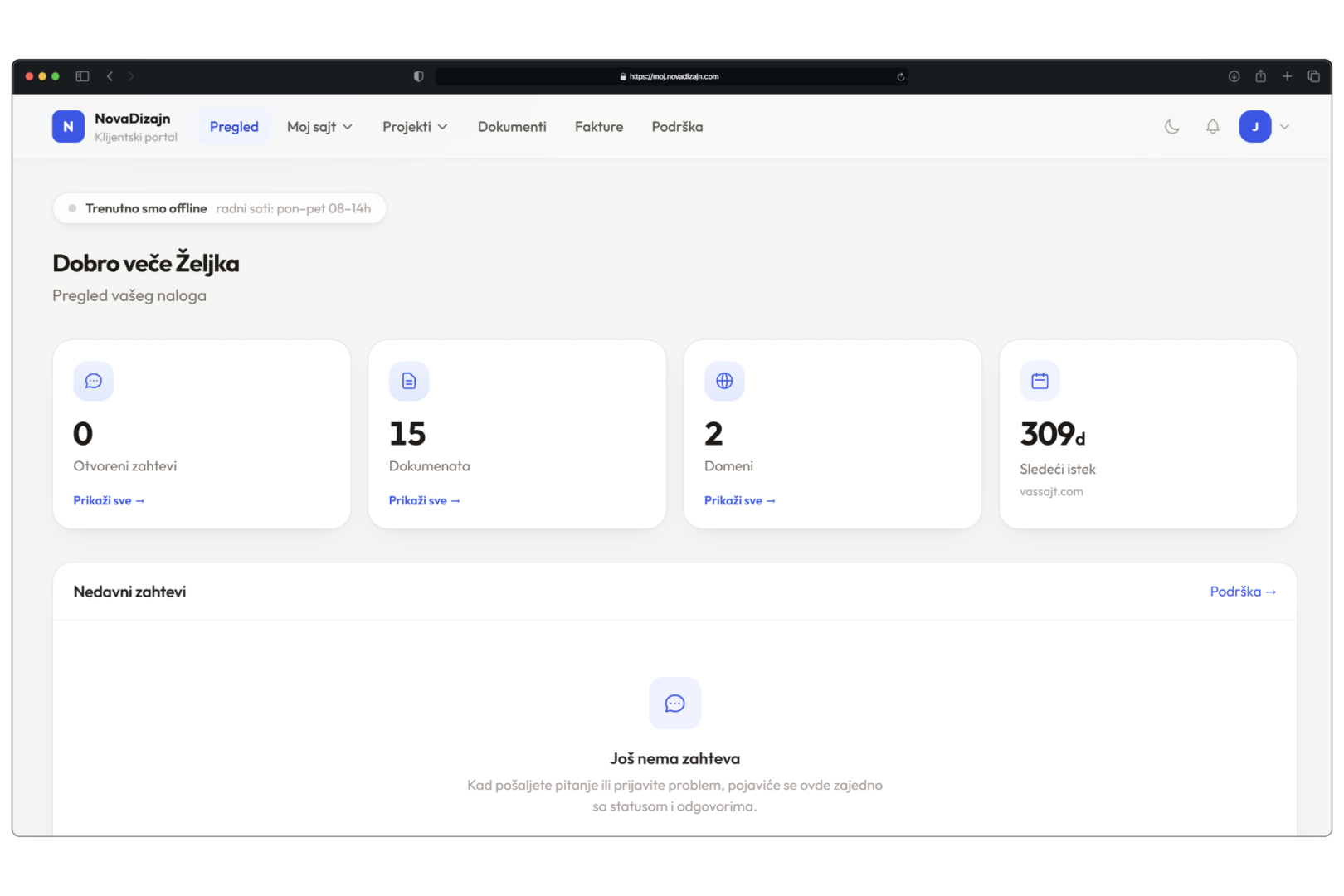
The biggest complaint about maintenance is not knowing what you're paying for. That's why maintenance comes with a place where you can see what's been done at any moment. It costs nothing extra.
The NovaDizajn portal
No silence between two emails
With maintenance, silence isn't just uncomfortable, it's the most common reason clients cancel a service they actually need. The portal exists so there's none of it.
A community of clients
People who've been through the same as you
You ask questions about hosting, domains and emails that land in spam to people who solved the same ones a couple of months ago, not by searching through forums.
We don't lock you in with us
Maintenance is a choice, not a contract that's hard to leave. Agencies that keep the accounts on their side do it because it makes it harder for the client to go, not because it's any safer.

WordPress maintenance FAQ
The questions we hear most before working together, that aren't already answered above.
Don't see your question on the list?
Ask us directly. You'll get a reply within 24 hours, no obligation.
Ask a questionWhat's included in WordPress maintenance services?
Updates to WordPress core, the theme and plugins, usually the first evening in your time zone after they’re released, tested on a staging copy before they go live. Daily off-host backups that we restore from time to time, so we know they work. Security, intrusion and uptime monitoring. A monthly check of the form, tracking, speed and SSL certificate. Up to 3 small edits a month on Website Care, 5 on Store Care. And a one-page monthly report of what was done, with no technical jargon. If something breaks in between, we usually respond within a few hours, at the latest within 24 hours. New to the idea? Read what a WordPress care plan is.
How much does WordPress maintenance cost?
WordPress maintenance costs from €990 a year ($1,190) on the Website Care plan, and from €1,200 a year ($1,390) on Store Care for WooCommerce stores, both paid 12 months in advance. If you don’t need ongoing care, we work pay-as-you-go, from €50 ($60) per hour. A neglected site is cleaned up once, billed by the hour, and you get the estimate after the audit.
How much does WordPress maintenance cost per month?
We don’t bill monthly. Website Care is €990 a year ($1,190) and Store Care is from €1,200 a year ($1,390), both paid 12 months in advance. A site that doesn’t need ongoing care is billed by the hour, from €50 ($60).
How often do you update plugins and back up the site?
Updates go in the first evening in your time zone after they’re released, on a staging copy first and then live. Backups run every day and are stored off the host.
What counts as a small edit?
A change to text, an image or a product price that takes up to 15 minutes. Website Care includes up to 3 a month, Store Care up to 5. Unused edits don’t carry over to the next month. Anything bigger is billed at €50 ($60) per hour.
What happens if I cancel?
You can cancel anytime, with no notice period. The year you’ve paid for runs to its end; unused months aren’t refunded. You get the latest backup and the access list when you leave.
Should I outsource WordPress maintenance or do it myself?
Do it yourself if the site is small, rarely changes, and you have a staging copy and a backup you have actually restored. Outsource it when inquiries or orders come through the site, when several people edit it, or when two days of downtime would cost you real money, which means someone else checks the form and the checkout while you run the business. Either way, keep the hosting, the domain and the admin in your name.
What does the maintenance agreement with you cover?
The agreement you sign lists the work: updates tested on a staging copy first, daily off-site backups with restore checks, security and uptime monitoring, a monthly check of the form, tracking and speed, and the number of small edits (3 on Website Care, 5 on Store Care, up to 15 minutes each). It states the response time, usually within a few hours and at the latest within 24 hours, and how you leave: no notice period, the paid year runs to its end, and you get the latest backup and the access list. What any maintenance contract should say is in our contract guide.
Do you maintain WooCommerce stores?
Yes, on the Store Care plan, from €1,200 a year ($1,390). On top of Website Care it covers WooCommerce, payment and courier plugin updates, a monthly check of the cart and checkout pages, and up to 5 small edits a month.
Do you offer white label WordPress maintenance for agencies?
Yes. We maintain your clients’ sites under your brand and under NDA, and the end client deals only with you. How the handover works is on our white label page.
Do you maintain sites you didn't build?
Yes, that’s the larger part of the work. The audit comes first, because we don’t take over someone else’s site blind. It’s not the first time we’ve opened a site someone said wasn’t worth touching.
Can't I just click update myself?
You can, and in most cases nothing bad will happen. The problem is the smaller share of cases where two plugins clash, where you need to know how to roll back. If you have a staging copy and a backup you’ve tried to restore, updating things yourself is perfectly fine.
What if my site breaks at ten on a Friday night?
We usually respond within a few hours, at the latest within 24 hours, and that’s written into the quote. We don’t promise round-the-clock cover or a reply in five minutes, because we can’t deliver that.
Why pay for maintenance when nothing's happening?
Because that’s exactly what you’re paying for: nothing happening. Just like servicing a car: the cost feels pointless while everything’s fine, and pays for itself the one time it isn’t. That’s why you get a list of what’s been done every month, so you can see the work is happening.
Do I need maintenance if I don't touch the site at all?
Yes, especially then. A site no one touches still ages: plugins stop being maintained, the PHP version changes, the certificate expires. The sites that get hacked most are the ones someone built a couple of years ago and forgot.
Let your site stop running on luck.
Tell us briefly what kind of site you have, where it's hosted and whether anyone looks after it. We reply within 24 hours with an estimate. If it turns out your site doesn't call for ongoing maintenance but one clean-up and peace of mind, we'll tell you that. Not ready for a quote yet? Send your site for a free written site check: within three working days you get, by email, three things it's losing and the fix we'd start with.
Request an estimateReply within 24 hours · No obligation · We'll tell you honestly if we're not the right team