A WordPress maintenance contract should say exactly what work is done, how fast someone responds when the site breaks, who owns the hosting, domain and admin accounts, and how you leave. If the agreement you are about to sign is vague on any of those four, ask for it in writing before you pay.
Most guides on this topic are written for the agency that sells the plan. This one is written for the owner who signs it and wants to be able to walk away later without losing the site. The ten clauses below are the ones we put in our own agreement, and at the end we show how we answer each of them, including where we do not promise something.
In short
- A maintenance contract is only as good as its list of work. “Updates and backups” is not a list.
- The clauses that protect you most are the ones nobody advertises: who owns the accounts, what a small edit is, and what you get when you leave.
- Response time belongs in writing. So does what happens when an update breaks the site.
- A store needs more than a brochure site: payments, couriers and a checkout that is tested every month.
- If a provider will not write down the response time and the exit terms, treat that as the answer.
Contract, plan or quote: what you actually sign
A care plan is the package on the pricing page. A quote is the price for your site. The contract, or maintenance agreement, is the document that turns both into obligations: what the provider has to do, by when, and what happens if they do not. When a dispute comes up, the plan page does not count. The agreement does.
Many small providers work without one. You pay a monthly invoice, and the scope lives in an old email. That works until the site breaks and both sides remember the promise differently. With us, you sign an agreement that lists the work, the response time and the exit terms, which means nobody has to rely on memory when something goes wrong.

The 10 clauses to check before you sign
For each clause, here is what it should say and the red flag that tells you it does not.
1. Scope: the exact list of work
It should name each task and how often it happens: core, theme and plugin updates, backups, security and uptime monitoring, a check that the contact form and tracking still work, reporting. Red flag: “general maintenance as needed.”
2. How updates are tested
It should say whether updates go to a staging copy first or straight to the live site. Testing on a copy means a plugin clash shows up there, not in front of your customers. Red flag: “automatic updates” with no mention of testing.
3. Backups and restore checks
It should state how often backups run, where they are stored and whether anyone restores them to check they work. A backup on the same server as the site does not help when that server goes down. Red flag: “daily backups” and nothing about where they live or whether they have ever been restored.
4. Response time, in writing
It should give a number: how many hours until someone starts on a site that is down, and what counts as urgent. FatLab’s contract guide puts critical issues at a 1 to 2 hour response as a common commitment (FatLab, 9 September 2025). Whatever the number, it has to be one the team can actually keep. Red flag: “fast support” or “priority support” with no hours.
5. What counts as a small edit
Most plans include a few small changes a month. The contract should say what one is (text, an image, a product price), how long it may take, how many you get and whether unused ones carry over. Red flag: “minor changes included” with no definition, which ends in an argument over what minor means.
6. What extra work costs
It should give the hourly rate or how extra work is quoted, and say that nothing outside the scope starts without your approval. Red flag: no rate at all, so the first invoice for extra work is a surprise.
7. What happens when an update breaks the site
It should say who rolls back, how fast, and that the fix is part of the plan when the provider’s update caused the break. Red flag: a clause that makes every post-update fix billable work.
8. Who owns the accounts
This is the clause almost no contract guide covers. The hosting, the domain and the WordPress admin should be in your name, with the provider added as a user. If the provider holds the accounts, leaving depends on their goodwill. Red flag: “we manage hosting and domain for you” with no mention of whose name they are in.
9. Term, notice and refunds
It should state how long the agreement runs, how much notice you have to give and whether any prepaid amount is refunded. The same FatLab guide describes 30 days’ written notice as the industry standard for month-to-month agreements and notes that annual contracts may ask for 60 or 90. Red flag: automatic renewal with a long notice period hidden at the end.
10. What you get when you leave
It should list what is handed over: the latest backup, every access detail the provider created, and any reports or audits. Red flag: nothing about leaving at all.
What a contract cannot promise
Read the promises as carefully as the gaps. Round-the-clock cover and a reply in five minutes cost real money, because someone has to be awake and on call. A small team that writes “24/7” into the contract either has that staff or will break the promise. We do not promise round-the-clock cover or a reply in five minutes, because we cannot deliver that. A response time you can rely on is worth more than one that only looks good on paper.
The same goes for “we guarantee your site will never be hacked.” Nobody can. What a contract can promise is the work that makes it unlikely and the steps that follow if it happens.
WooCommerce stores: three extra clauses
A store has more moving parts than a brochure site, so its agreement needs more.
- Payment and courier plugins. The contract should name them as part of the updates, because they break checkout more often than anything else.
- A monthly check of the cart and checkout. Not “the site loads,” but a check that a buyer can actually reach the end of checkout. A store can show a working home page and still lose every order at the last step.
- When updates run. The contract should say when updates happen, because a store should never be updated while people are buying. We run updates only at night in your time zone, when the site has no visitors, which means a clash never lands in the middle of a sale.
How we answer the 10 clauses
This is what our agreement says, taken from our WordPress maintenance plans. Use it as a benchmark for any quote, ours included.
| Clause | Our answer |
|---|---|
| 1. Scope | Core, theme and plugin updates; daily off-site backups with restore checks; security, intrusion and uptime monitoring; a monthly check of the form, tracking, speed and SSL certificate; small edits; a one-page monthly report. |
| 2. Update testing | Updates go to a staging copy first and only then live, always at night in your time zone, when the site has no visitors, usually the first evening they are released. |
| 3. Backups | Every day, stored off the host. From time to time we restore them to a staging copy, so we know they work. |
| 4. Response time | Usually within a few hours, at the latest within 24 hours, written into the quote. No round-the-clock cover. |
| 5. Small edit | A change to text, an image or a product price that takes up to 15 minutes. 3 a month on Website Care, 5 on Store Care. Unused edits do not carry over. |
| 6. Extra work | Billed at €50 ($60) per hour. A neglected site is cleaned up once, at a price agreed after the audit and before work begins. |
| 7. Broken update | Updates are tested on staging first, so a clash shows up there. If something breaks between two reports, the response time above applies. |
| 8. Accounts | Hosting, domain and admin are in your name from day one. |
| 9. Term and notice | Yearly plans paid 12 months in advance: Website Care from €990 a year, Store Care from €1,200 a year. Cancel anytime with no notice period. The year you have paid for runs to its end; unused months are not refunded. |
| 10. Leaving | You get the latest backup and the access list. The audit stays with you even if we never work together. |
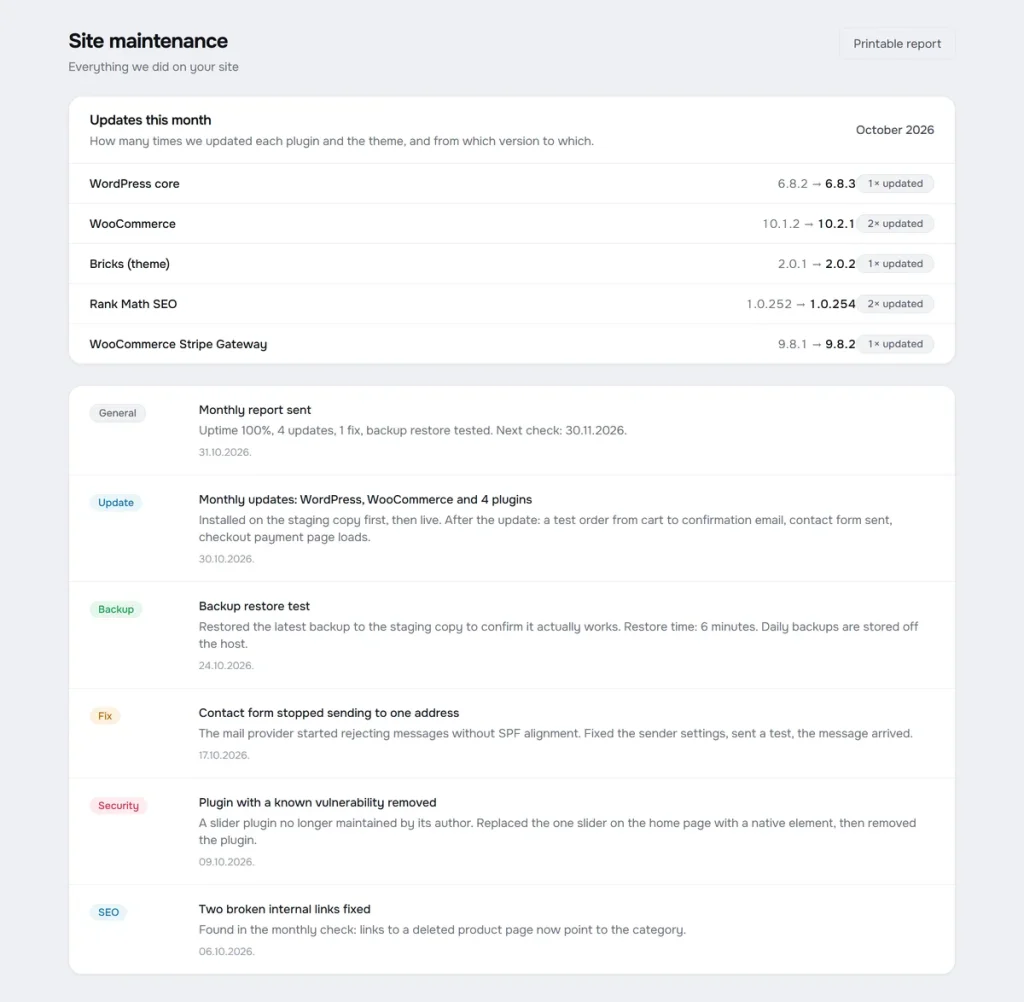
Every task is also logged in our client portal with the date and the time spent, which means you can check the work at any moment instead of waiting for a monthly email.
Questions to ask a provider
Before you compare prices, ask each provider to answer these in writing:
- Whose name are the hosting, domain and admin in?
- Where are backups stored, and when did you last restore one?
- How many hours until you start on a site that is down?
- Who pays when your update breaks the site?
- What exactly do I get on the day I leave?
For the price side, we wrote a separate guide with what a maintenance price really includes and seven questions that show what a quote leaves out. If you are still deciding whether you need a plan at all, start with what a care plan covers. Keeping the work in-house? Use the checklist we run on every site we look after.
Frequently asked questions
Is a WordPress maintenance contract legally required?
That depends on your country and your business, and this article is not legal advice. What we can say from practice is simpler: without a written agreement, the scope and the exit terms exist only in emails and memory. That is why we always put them in a contract you sign.
How long should a maintenance contract run?
Most run month to month or for a year. What matters more than the length is the exit: a year paid upfront is fine when you can cancel without a notice period and leave with your backup and access details.
Can I cancel a WordPress maintenance contract early?
That depends on the notice and refund clause, which is why it belongs in the contract before you sign. With us you can cancel anytime with no notice period; the year you have paid for runs to its end and unused months are not refunded.
Next step
If you have a maintenance quote in front of you, or no agreement at all, tell us what kind of site you have and where it is hosted. We reply within 24 hours with what we would put in the agreement. Not ready for a quote? Send your site for a free written site check and see what it is losing first.